Adding Devices to HPE IMC with Access Parameter Templates
How to add network devices to HPE IMC properly: create SNMP and SSH access parameter templates first, then discover devices manually.
Adding a device to IMC is straightforward once you get the hang of it, but a little preparation makes sure devices go in properly and stay manageable.
1. Set up access parameter templates first #
IMC’s first screen prompts you to add a device. Before you do, create templates for SNMP and SSH access. You can then apply the same credentials to groups of devices instead of typing them in every time.
Go to System → Resource Management → Access Parameter Template and click Add.
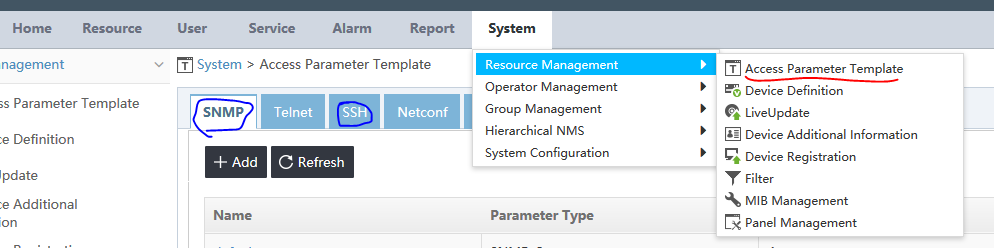
Create one SNMP template and one SSH template. Avoid Telnet if you can, because credentials are sent in clear text. If you have to use it, give it a password that isn’t used anywhere else.
To configure SNMPv3 on the switch side, see SNMPv3 on ArubaOS-Switch with IMC.
2. Discover the device #
You can add devices manually or with auto discovery. For one device or a small number, use manual discovery.
Go to Resource → Add Device and enter the device’s IP address and name. If you leave the name blank, IMC picks it up from SNMP.
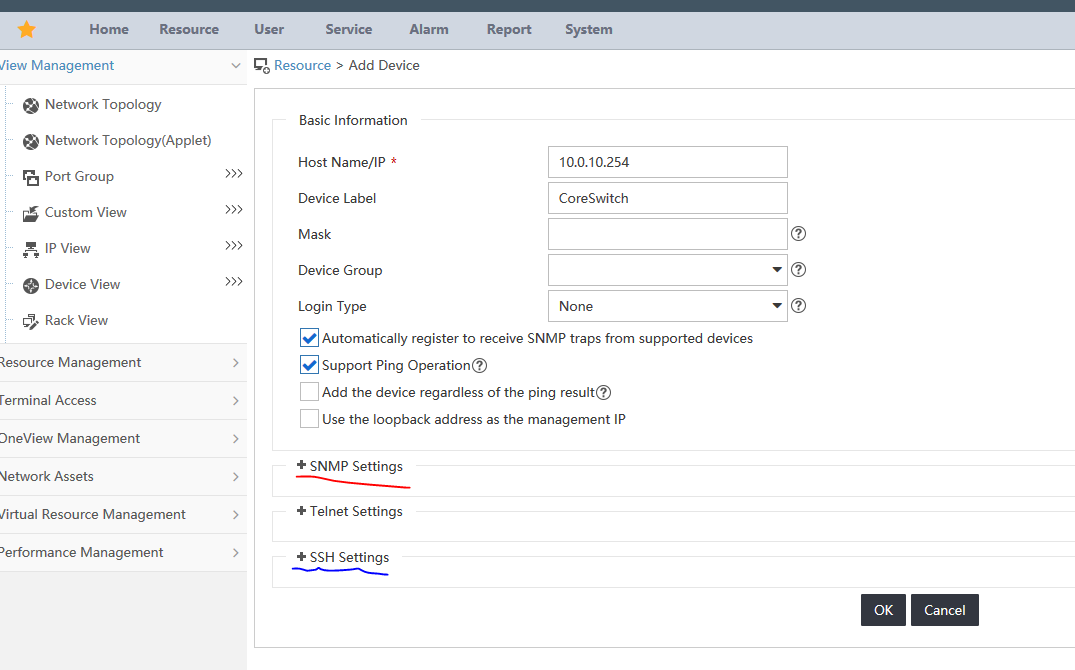
Click SNMP Settings and select the SNMP template you created in step 1, then do the same under SSH:
- SNMP lets IMC poll the device’s MIBs.
- SSH lets IMC take configuration backups.